
Homebase — Fixing Onboarding Drop-Off by Rebuilding the System Underneath It
When Product pulled me into onboarding drop-off, we started with a simple question: why are people not finishing their onboarding packets? The number was rough—only 28% of employees were completing required packets—but the part that worried me more was what that implied. Managers were still getting people onboarded somehow. So where was the rest of the process happening?
Our hunch was that the product wasn’t just losing users—it was pushing them elsewhere.
The first thing we realized: “drop-off” wasn’t the real story
Once we started tracing the onboarding journey end to end, it became obvious that the experience wasn’t one flow. It was a chain of disconnected moments:
Employees mostly tried to complete onboarding on mobile, often in short bursts.
Managers needed to approve forms before people could work, but had limited visibility into what was missing.
Documents had wildly different requirements, but the system treated everything like the same kind of upload.
Because packets weren’t configurable, managers were sending the same generic set of forms regardless of role or worker type.
So when employees got stuck, the fallback was predictable: managers moved the process offline—texts, email, handing someone paperwork, “send me a picture of that document,” anything that got the job done.
That’s when the project changed shape. We weren’t dealing with a few confusing screens. We were dealing with a system that didn’t reflect operational reality.
We stopped looking at screens and started looking at the ecosystem
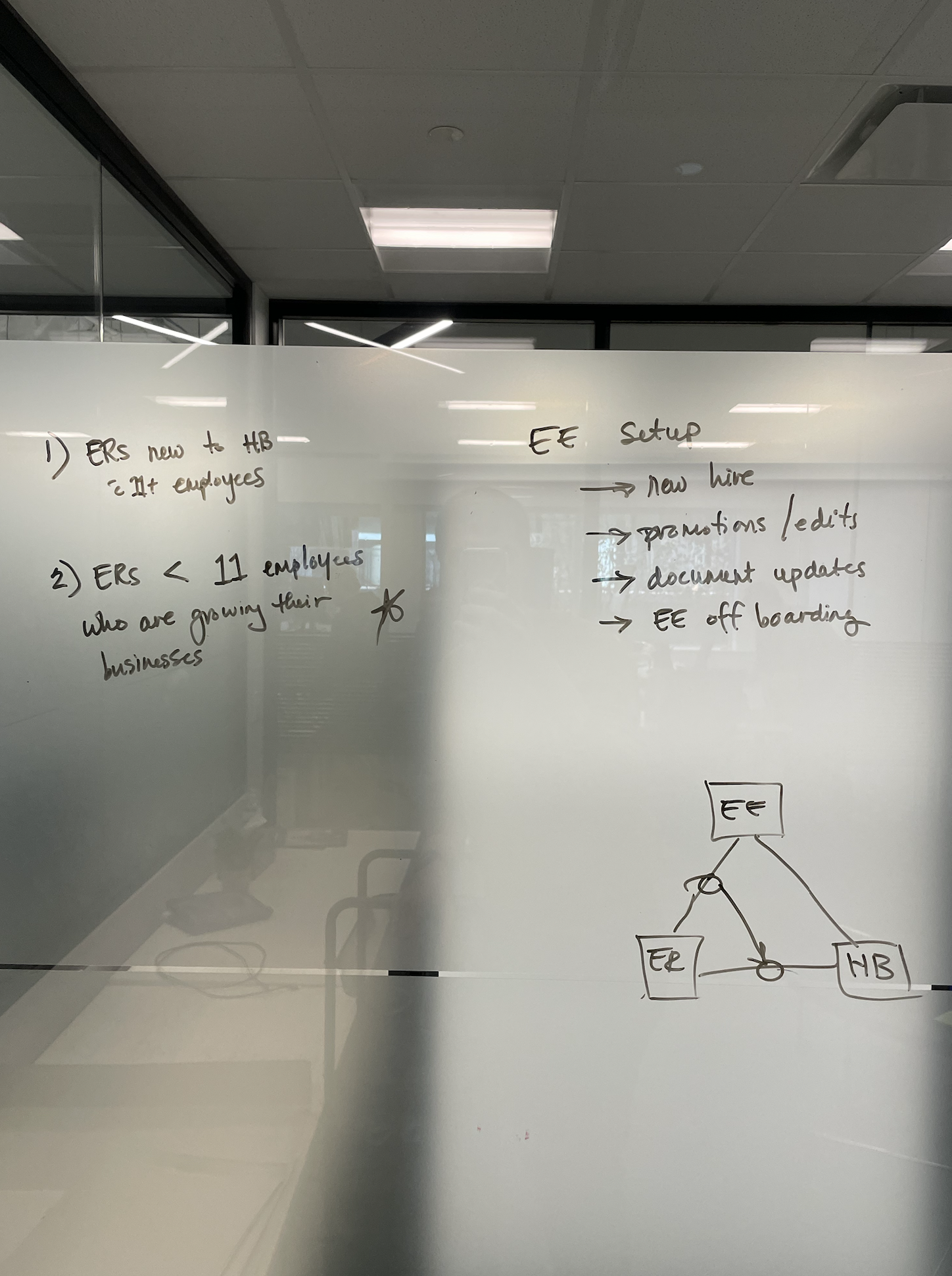
Instead of redesigning the UI immediately, we audited the onboarding ecosystem with Product, Engineering, and Compliance. We mapped:
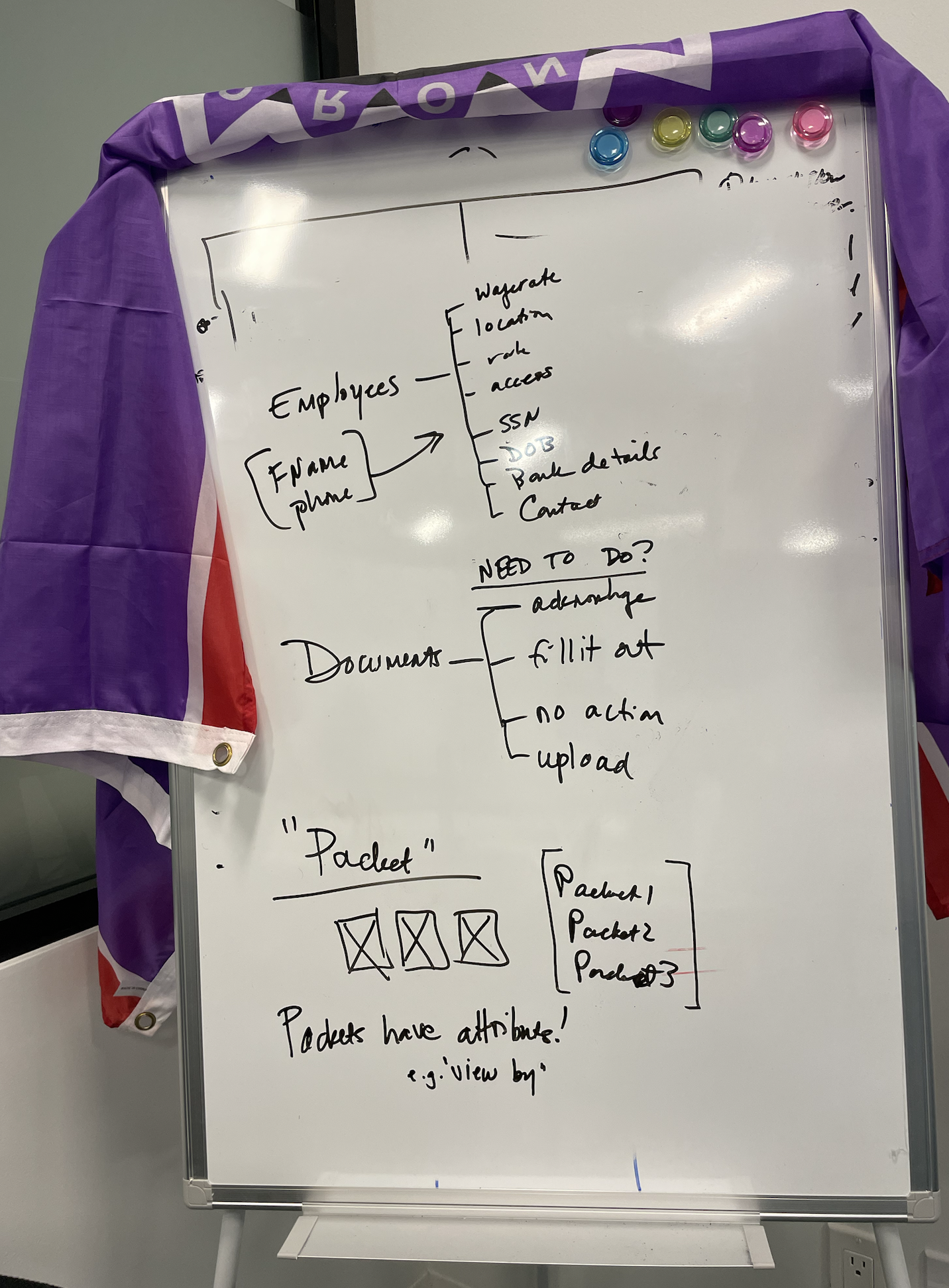
every document and data point collected
who needed access to it (employee, manager, HR, compliance)
when that access was required in the workflow
where the experience broke for employees and managers
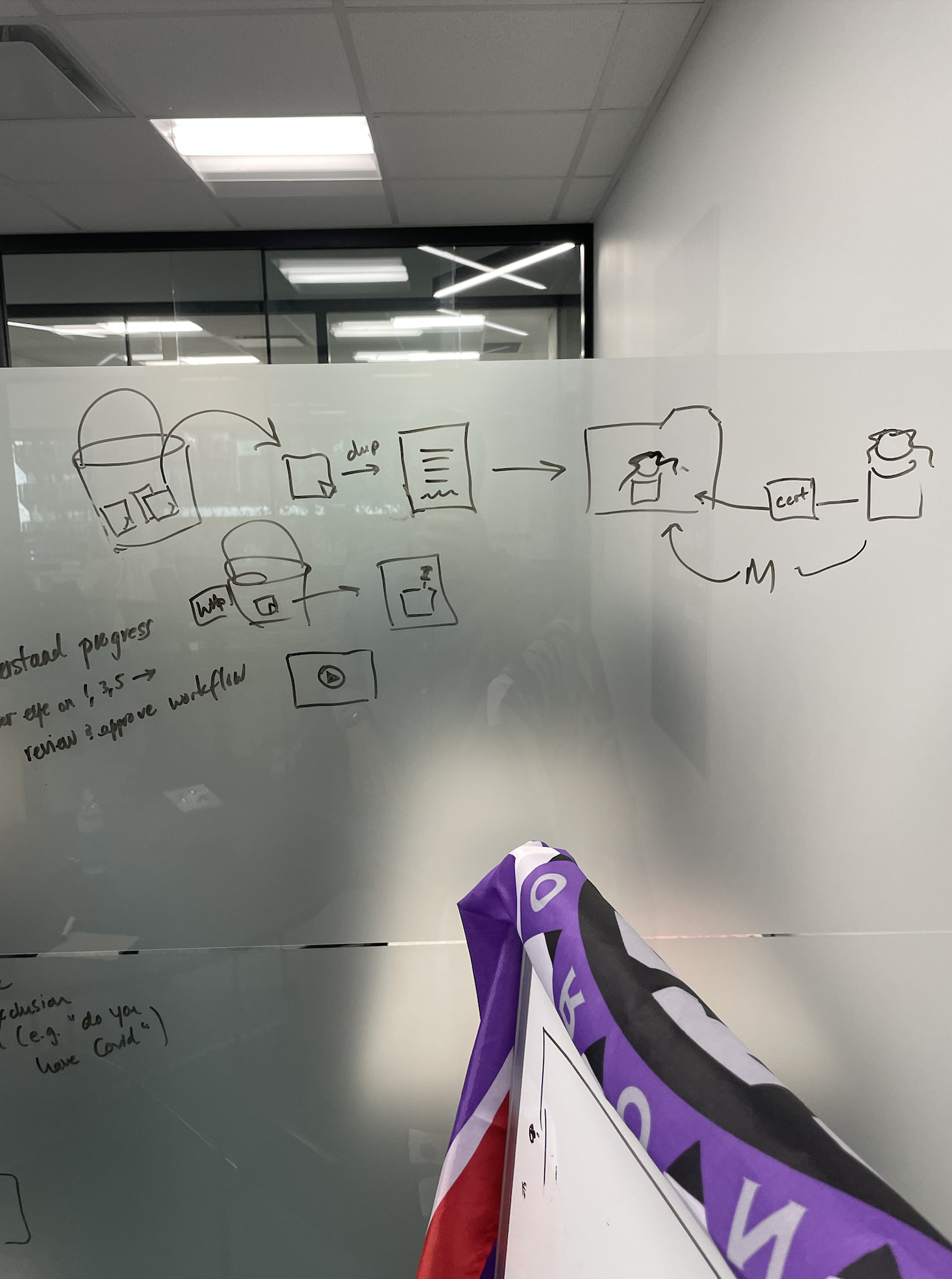
This was also where the engineering partnership mattered early. We held technical working sessions to understand storage constraints, permission logic, and state management. Because it didn’t matter how clean the UI was if the system couldn’t reliably answer basic questions like:
“Is this complete?”
“Who can see this document?”
“Can a manager share this with the team or is it sensitive?”
“What should be requested for this worker type?”
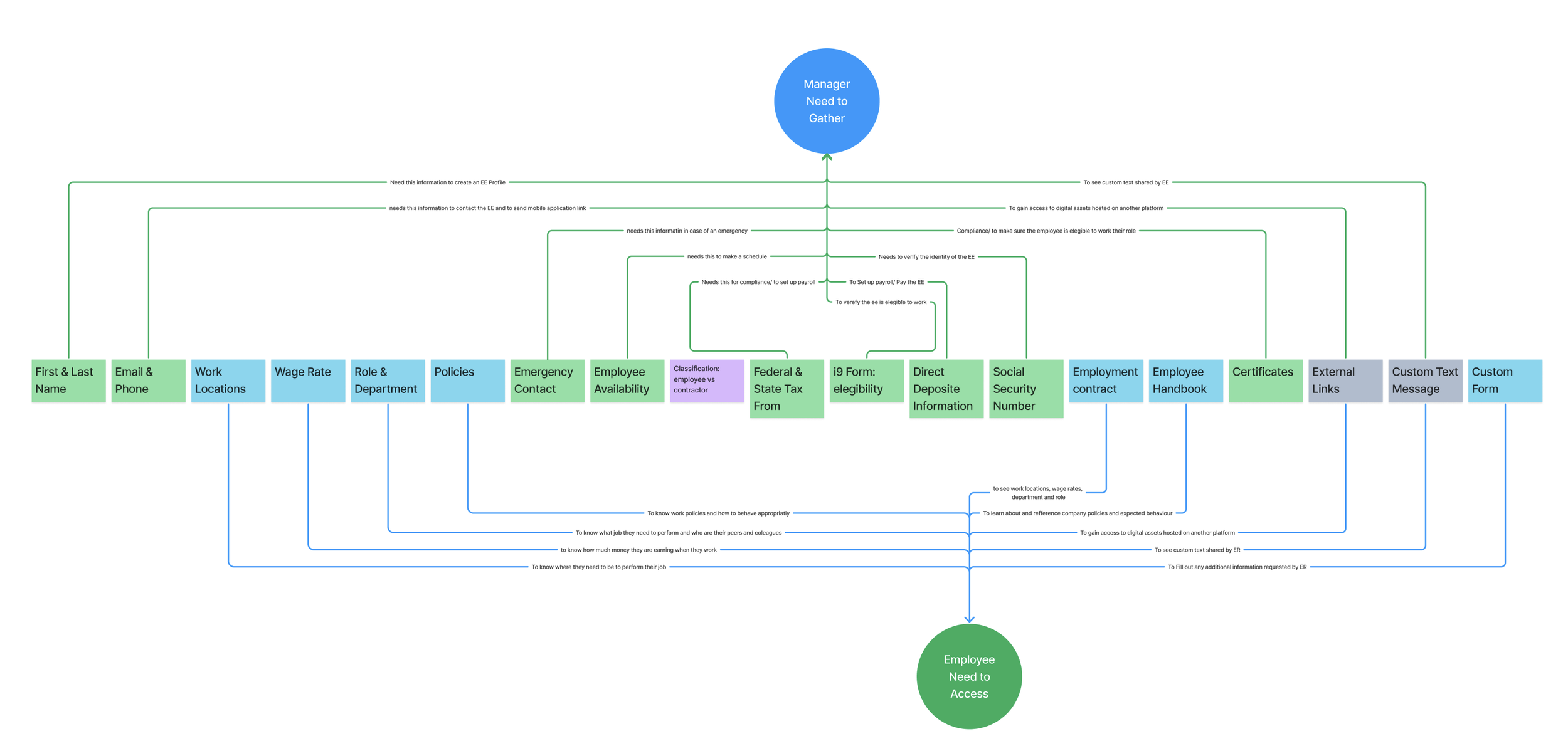
Mapping out the various document types and data points collected at the employee on boarding and tying it back to what information does each user type need to access and for what reason
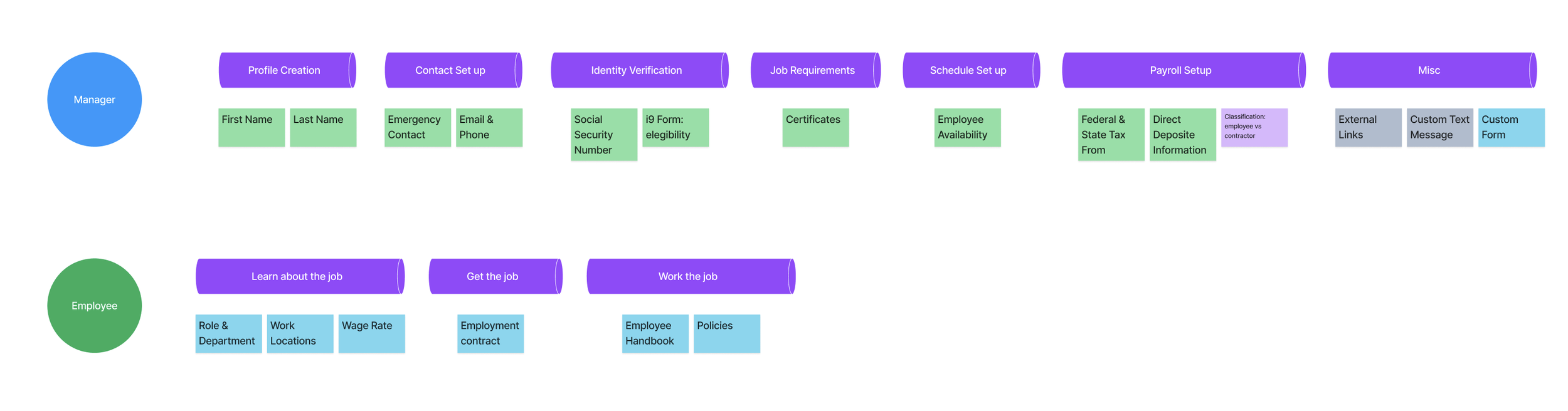
Identifying what data and documents did each is a persona need to get the job done in their boarding and day-to-day work cycle
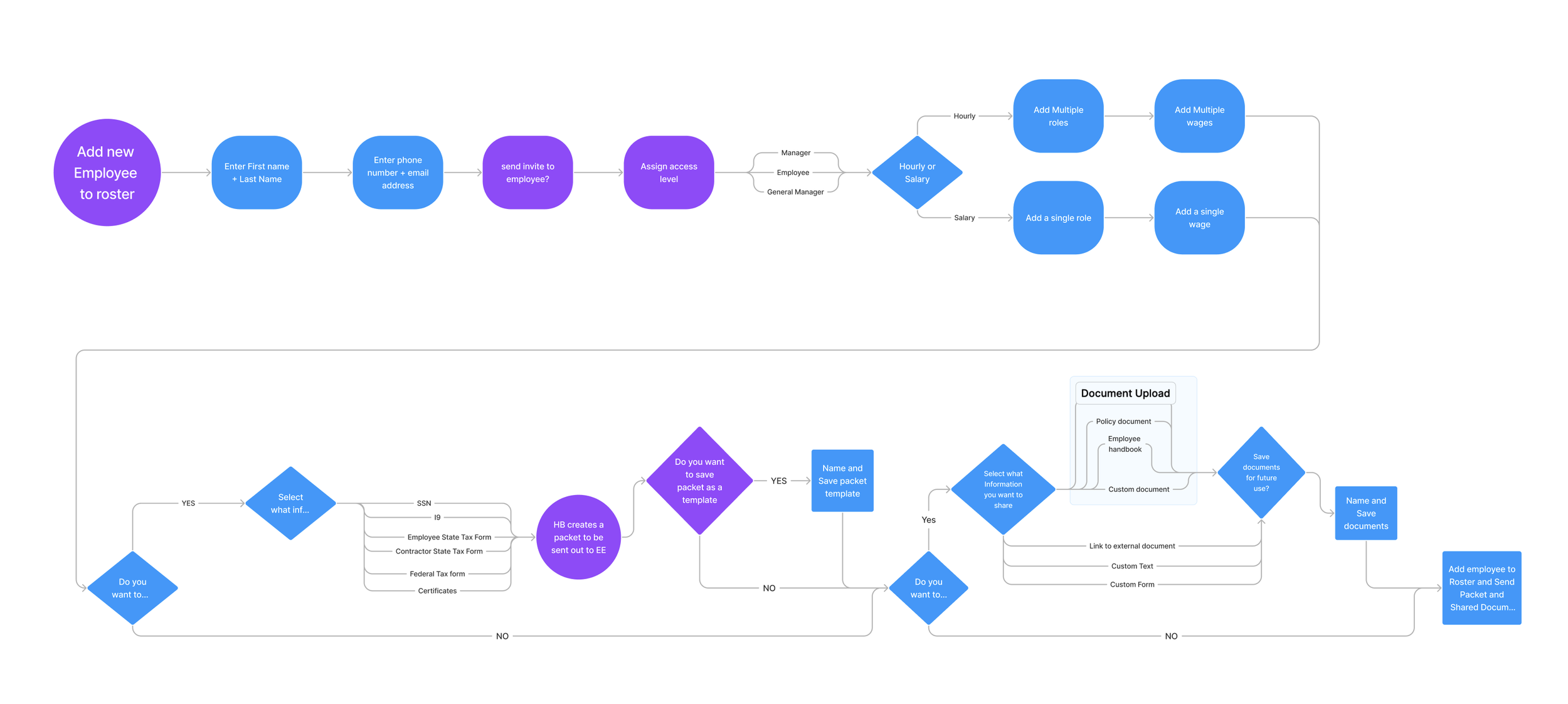
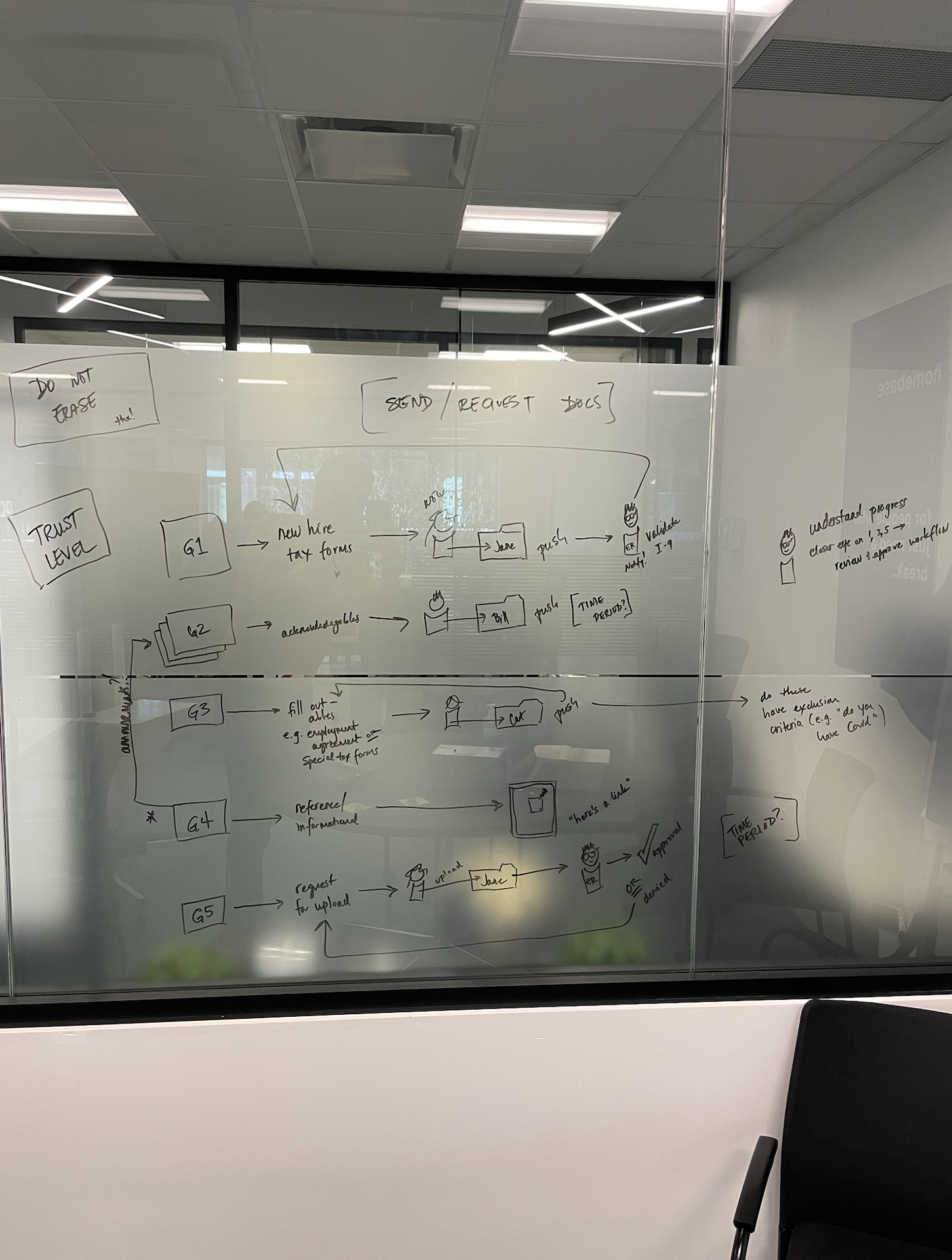
Defining the user flow for a manager adding a new employee to the roster
The turning point: we were mixing two different document worlds
A lot of onboarding felt messy because the product was treating all documents like they were the same thing. But they weren’t. We were actually dealing with two categories that have fundamentally different rules:
Sensitive employee documents
Identity and compliance documents that require restricted access and careful handling.
Organizational documents
Policies, handbooks, and general materials that are meant to be shared across a team.
That distinction sounds obvious in hindsight, but naming it unlocked everything else. Once we agreed those are different document types, the next step was aligning the product with that reality—separate storage logic, separate permission structure, and clearer ownership.
This is the moment where the work stopped being “onboarding UX improvements” and became “rebuilding the model that onboarding sits on.”
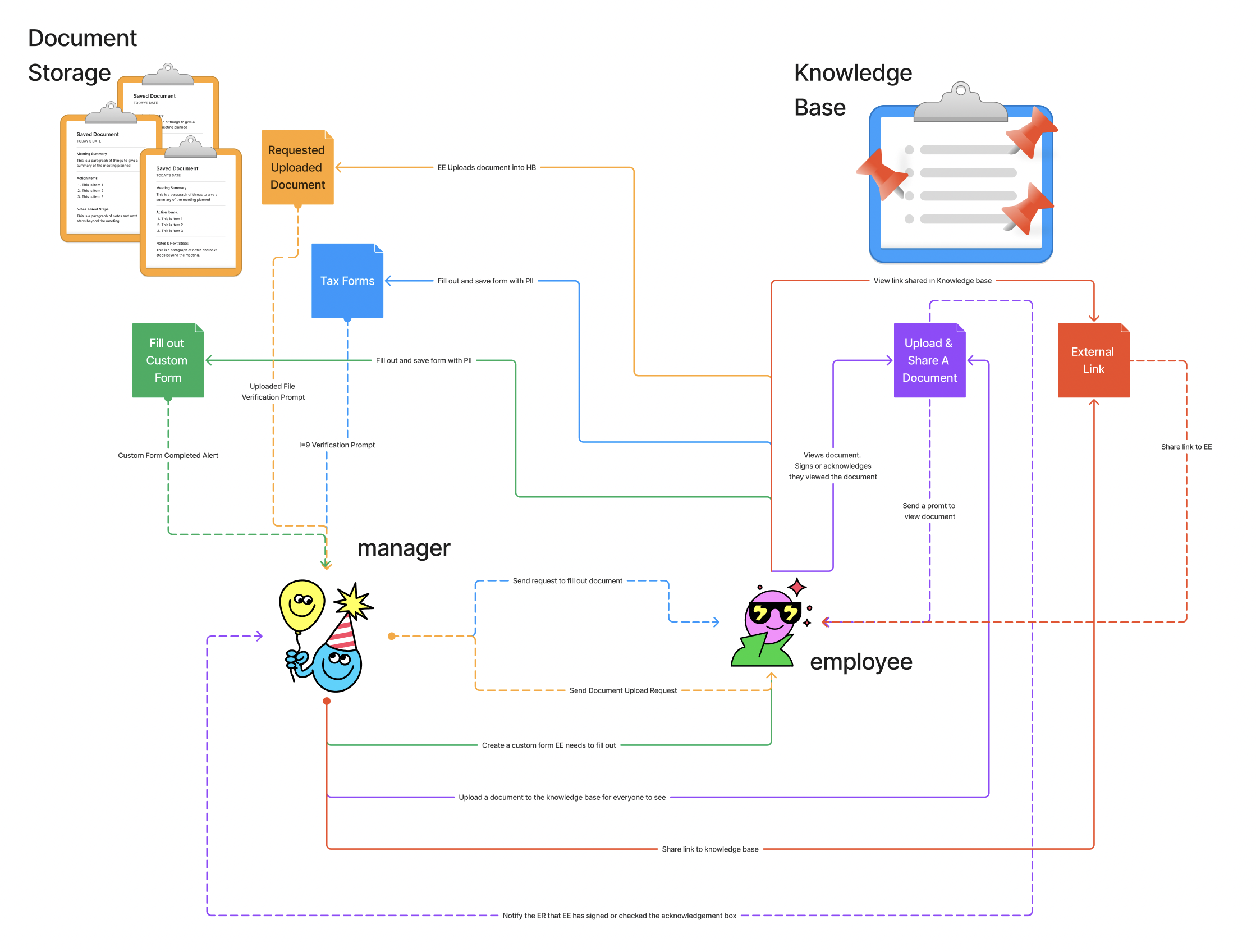
The second turning point: managers weren’t “sending packets”—they were running a workflow
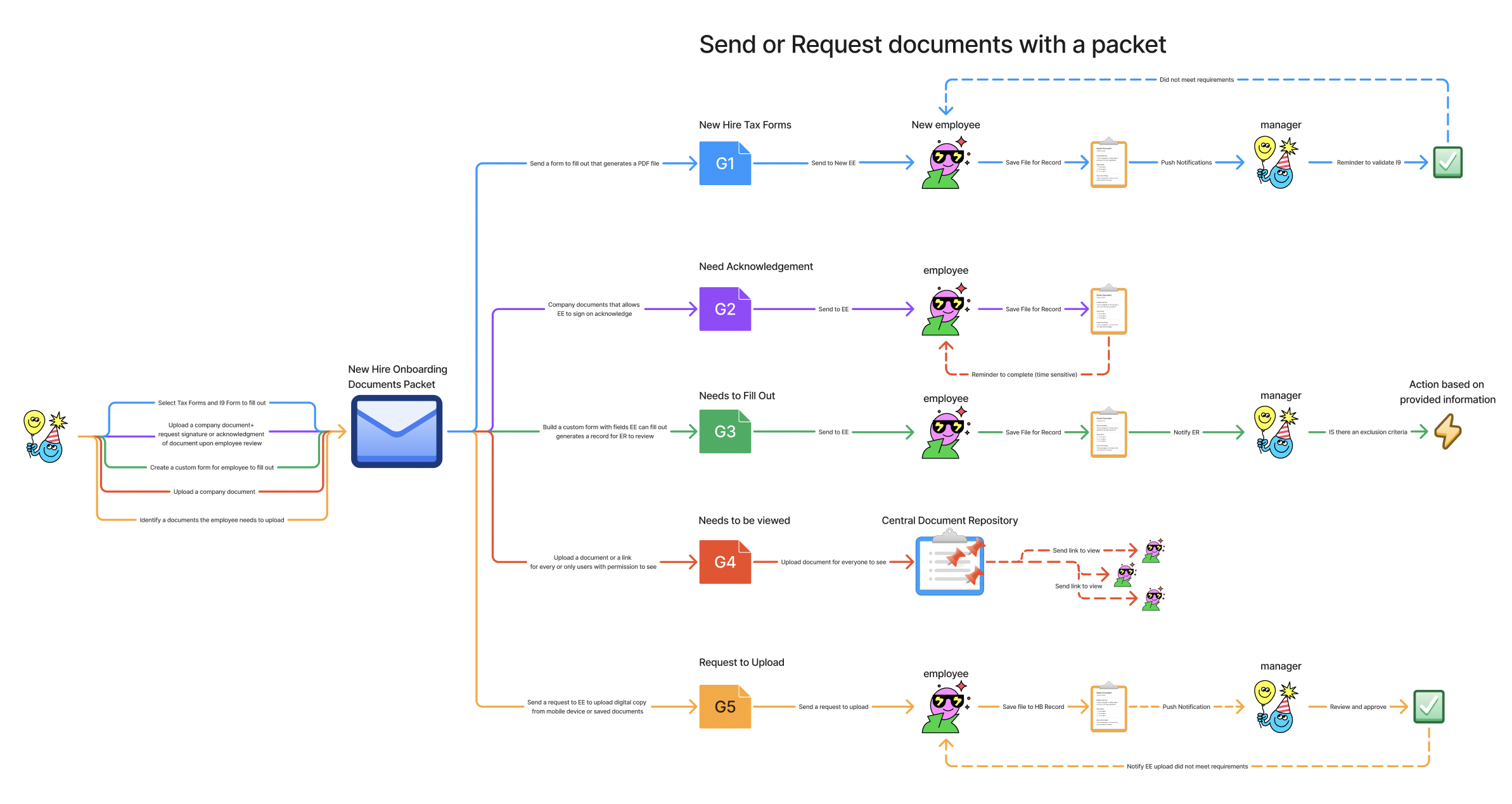
The other major gap was how packets were created. Managers weren’t trying to send a generic bundle of forms. They were trying to get different kinds of workers ready for work—each with different requirements.
But the product forced one static packet for everyone. That meant managers were doing the real configuration in their heads (or in texts and email), which again pushed the process offline.
So we shifted the goal: onboarding packets needed to become configurable, without becoming complicated.
That meant enabling managers to:
create packets by worker type
request certificates when needed
share company documents separately from sensitive items
track completion per employee in a way that made blockers obvious
We made a deliberate scope call so we could ship
At this point it would’ve been easy to accidentally boil the ocean—because once you touch documents and permissions you can end up redesigning the entire HR platform.
We intentionally did not take on:
a full generalized document management system for everything beyond onboarding
a centralized knowledge hub for company policies outside the onboarding context
Instead, we defined the project tightly: onboarding as a structured workflow.
Make packets definable. Make employee completion easy on mobile. Make manager visibility clear. Build in permission boundaries so compliance isn’t a checklist item—it’s a property of the system.
Designing it felt like designing a system, not screens
This part of the project was very collaborative with Product and Engineering. We spent time whiteboarding the data model and state logic before polishing UX, because the UI needed to reflect real states—required vs optional, started vs submitted, approved vs missing—without confusing people.
Mobile employee onboarding experience
Employees were the ones dropping off, and mobile was the primary touchpoint. So we redesigned onboarding around a checklist-based experience that works in short sessions:
requirements are clear and broken into manageable steps
completion state is visible (and feels achievable)
upload flows are focused, not overwhelming
progress persists across sessions (save and resume)
users can re-enter from multiple places without losing context
employees can review what they’ve submitted
This seems simple on the surface, but the real work was making it reliable—secure handling, correct permissions, and stable state persistence so people didn’t feel punished for leaving mid-flow.

Mobile onboarding screens that gather all the essential onboarding information and allow users to upload and share the required documents with their employer.
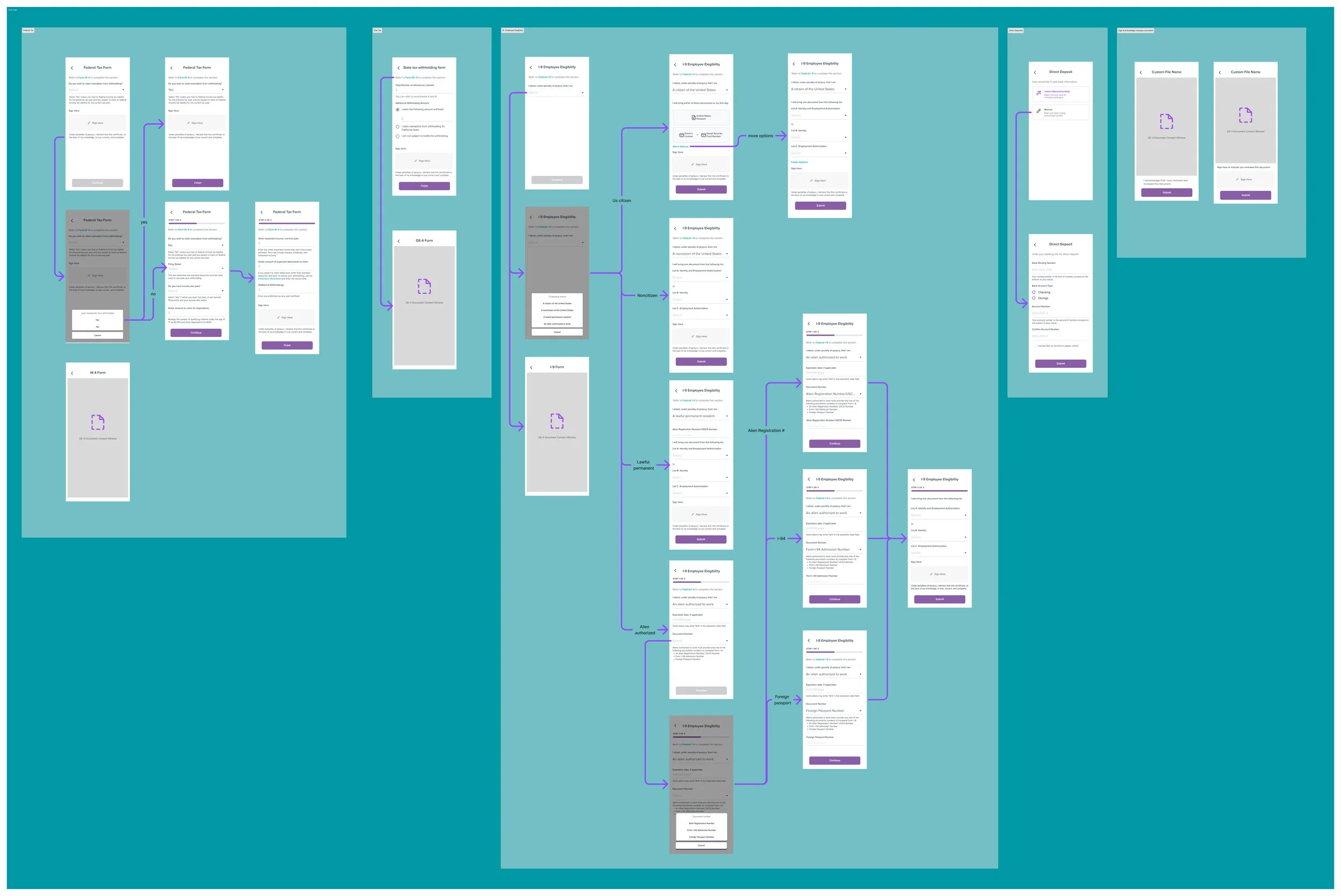
Subsequent user flows to upload each of the required document types
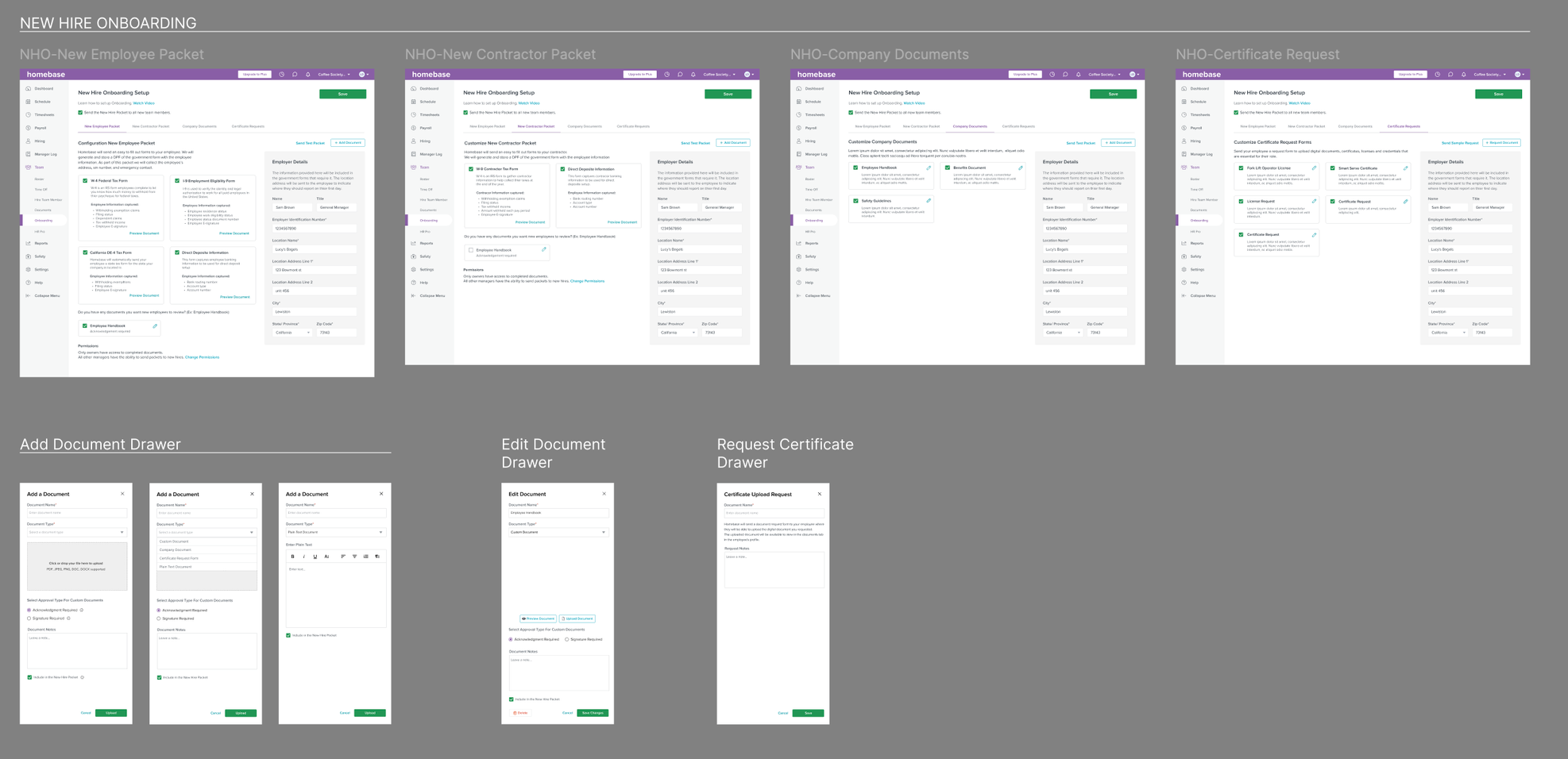
Onboarding packet creation experience
On the manager side, we rebuilt packet creation so it matched how managers think:
choose packet type (aligned to worker type)
add dynamic requirements (including certificates)
attach organizational documents separately
see completion clearly per employee, with fewer “guessing” moments
Product helped us keep it usable (not a settings maze), and Engineering helped ensure configuration mapped cleanly to storage and permission logic.
Reflection
The best part of this project wasn’t a single screen—it was that we stopped treating onboarding as “forms UX” and treated it as what it really is: a workflow that connects employees, managers, compliance requirements, and data ownership.
We took something that was fragmented and easy to abandon, and turned it into a structured system that could scale across worker types and future HR workflows—without trying to rebuild the entire platform at once.
Note: I transitioned out of Homebase prior to launch, so I don’t have access to post-release metrics for this implementation.